

Data analysis software for audit and finance
Let your hardware set the pace.
Turn CSV and Excel files into analysis you can review. Billions of rows, processed on your own computer, with every step recorded.
- Up to 14× faster than IDEA in our tests
- Client data stays on your computer
- Every change in the Change Log
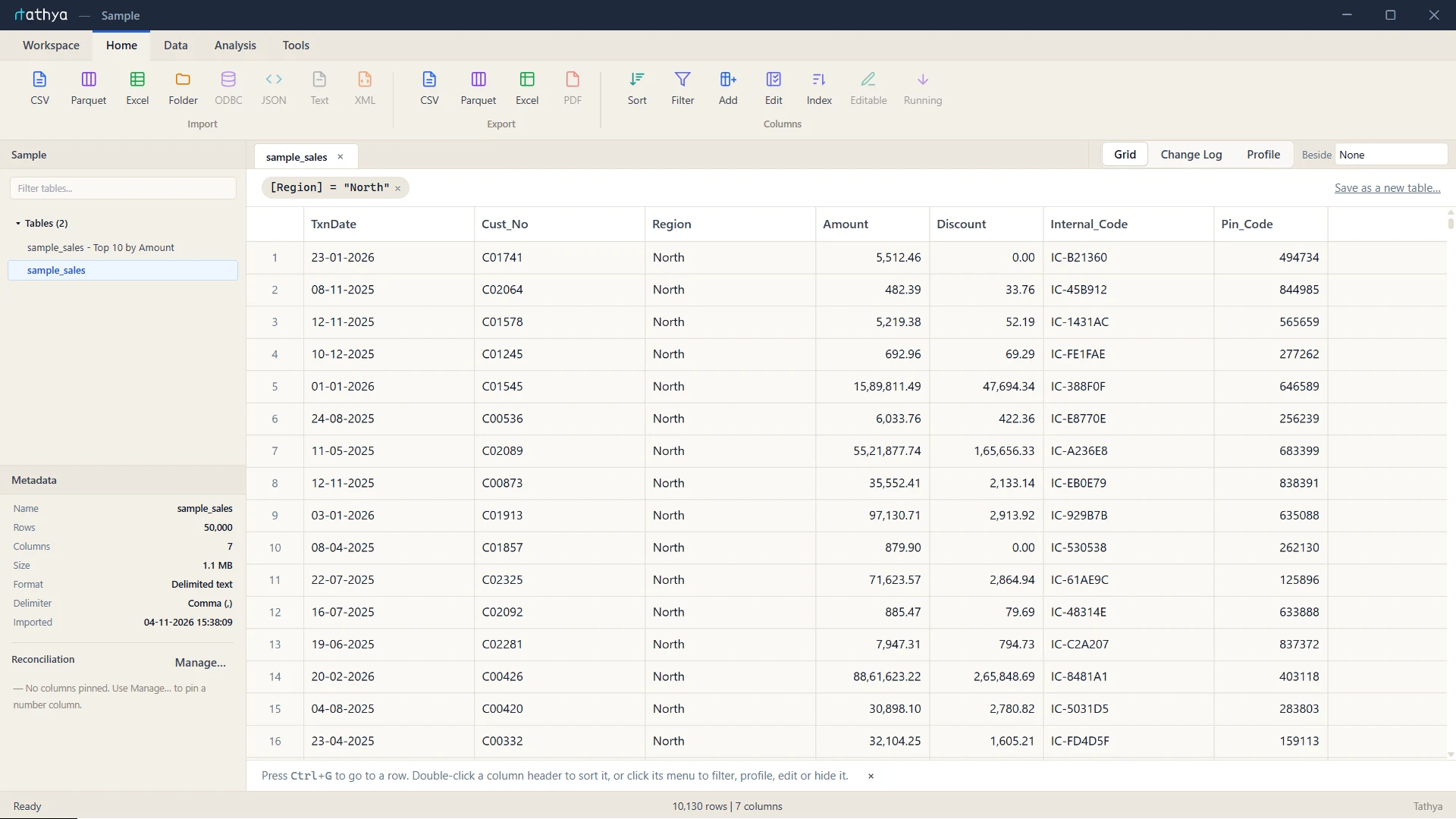
What is Tathya?
From raw files to reviewable analysis.
Bring files together
Import CSV, Excel and Parquet files, profile every column and append monthly files into one table.
Run the analysis
Filter, join and summarise with familiar formulas such as IF(), LEFT() and MONTH().
Review and export
Reconcile key totals, then export the results together with the history of how they were made.
Tools in the beta
Everything an audit file needs first.
Current tools. More tools arrive in the final release.
Import
CSV, TSV, Excel and Parquet, streamed straight from disk.
Column profile
Distinct values, blanks, min, max, median, quartiles, stray spaces and future dates.
Filter and formulas
One Formula editor for filters and calculated columns.
Sort and index
Sort by any column, even across 500 million rows.
Add, hide and edit columns
Calculated columns, type changes and renames.
Extract rows and Top N
Pull matching rows or the largest values into a new table.
Join
Inner, left, right, full outer and anti joins, keeping every matching pair.
Append
Stack monthly or branch files into one table.
Group and summarise
Totals, counts and averages by any column, saved as a table.
Random sample
Seeded samples you can repeat and show to a reviewer.
Reconciliation
Pin column totals and check them after every step.
Change Log
A readable record of every import, change and export.
Export
CSV, Excel and Parquet.
Workflows
Record or build a sequence of steps and rerun it on next month’s files.
Where today’s tools need extra work
Built for the files audit teams actually get.
| Tool | Works well for | Where it falls short |
|---|---|---|
| Excel | Familiar formulas and quick review | 1,048,576 rows per sheet; large workbooks slow down. |
| IDEA | Audit tests and structured workflows | Slower on large files, and heavy jobs use much more disk. |
| Python | Flexible analysis and automation | New file layouts need new code, and there is no built-in audit trail. |
| SQL | Joins, filters and large aggregations | Queries must be written for each file, and there is no built-in audit trail. |
| Cloud software | Shared access and collaboration | Client data has to be uploaded, and it needs a reliable connection. |
| Tathya | Large files, audit trail and repeatable workflows | Runs on your own computer, no code needed. |
Tathya vs IDEA · 500 million rows
Same file, same steps. Much less waiting.
| Step | Tathya is faster by |
|---|---|
| Export 100M rows to CSV | 14× |
| Group and summarise | 6.6× |
| Append 100M rows | 3.9× |
| Calculated column made permanent | 2.8× |
| Random sample | 2.3× |
| Column profile | 1.8× |
| Import 100M rows | 1.5× |
| Import 500M rows | 1.4× |
| Sort 500M rows | Finished (IDEA ran out of disk) |
Measured on the same 500-million-row file and computer, one timed run per step.
Data limits
Room to grow.
| Limit | IDEA | Tathya |
|---|---|---|
| Financial precision | About 15 significant digits | Exact Decimal, 18 digits* |
| Duplicate-key joins | First match only, unless you use a separate tool | Every matching pair |
| Grouped results | 32,000 rows in the result view | Saved as a full table |
| Excel imports | 4 GB file-size limit | Streaming .xlsx, full sheet height |
| Columns | 4,999 | ~90,000* |
| Rows | About 2.1 billion | ~15 billion per file* |
* Going higher in the final release.
Reusable workflows
Recurring audits, rerun on fresh data.
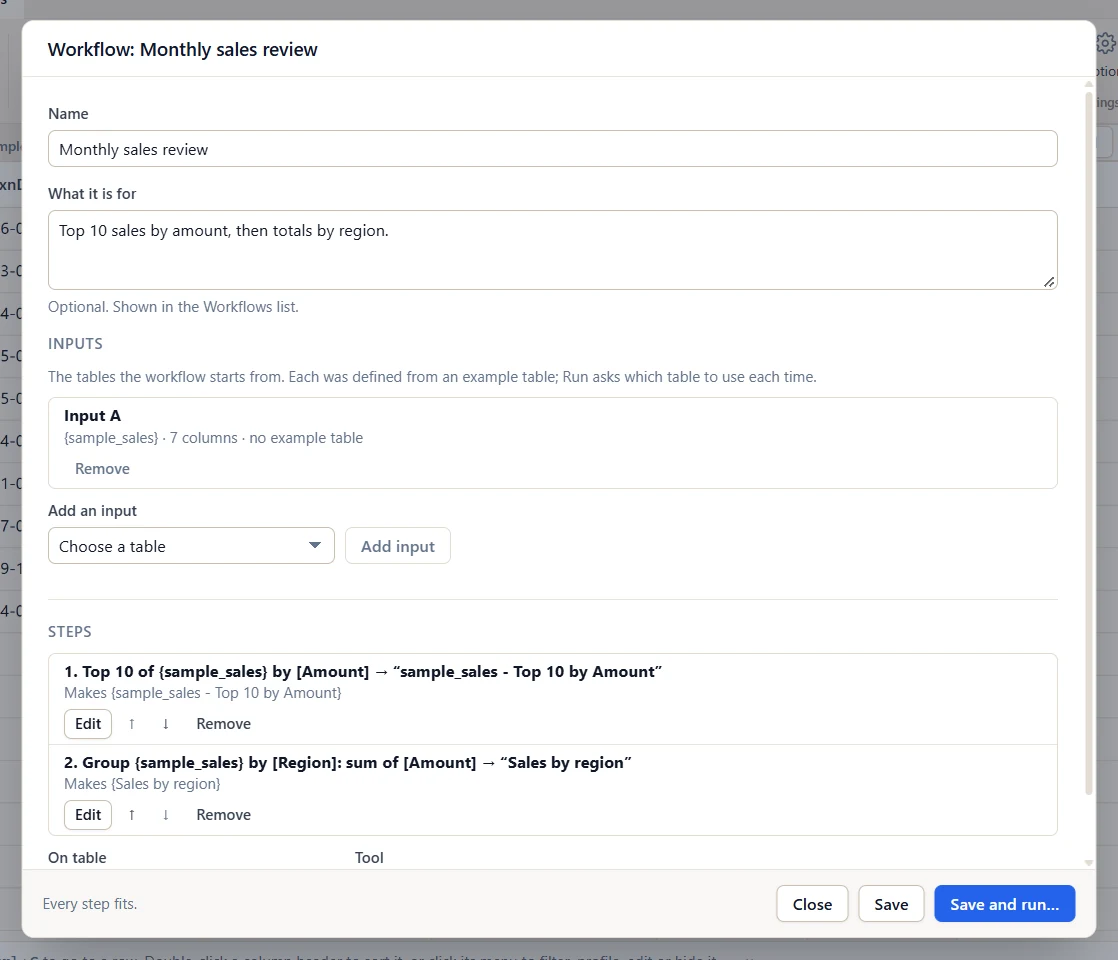
Open Tools → Automation to build and run workflows.
- Build or record steps. Build steps in the editor, record them as you work, or turn any derived table back into an editable workflow.
- Run on fresh data. Pick next month’s tables. Tathya checks the column names and types before it runs.
- Review the outputs. See every table it made, with row counts. The Change Log records each run.
Workflows can use filters, sorts, calculated columns, type changes, Top N, random samples, extracts, summaries, joins and appends. More steps arrive in the final release.
The Tathya assistant In testing
Ask in plain English. Runs on your own computer.
Describe what you want and the assistant builds the steps for you. It runs locally on your CPU, so your data never leaves your machine, and nothing runs until you say so.
Local and private
A small model that runs on your computer’s CPU. No GPU, no internet connection and no cloud service needed.
You approve every plan
Each request becomes a plan in words. Run it, edit any step in its usual dialog, or cancel. If the assistant is unsure, it asks.
Save it as a workflow
A plan that worked can be saved and replayed on next month’s table, with no AI involved.
Fully recorded
The Change Log names the assistant on every change it makes.
- Show only rows where Region is North
- Top 10 rows by Amount
- Group by Region and total Amount
- Add a column Net that is Amount minus Tax
- Profile the Amount column
Needs about 4 GB of free RAM while it’s in use. The model loads on your first request and unloads when idle. It is off until you turn it on in each workspace.
Your data. Your control.
Modern performance. Local control.
Processed locally
Analyse sensitive client data directly on your machine.
No uploads
Your files never go to a cloud analysis service.
Your folders
Choose where source files, workspaces and exports are kept.
Roadmap
What’s coming next.
Audit analysis
- Data-quality checks Blanks, invalid values and duplicate keys, with the rows behind them.
- Outlier analysis Statistical checks and Isolation Forest to rank unusual transactions for review.
- Benford’s law First-digit tests on amounts.
- Aging Age balances into buckets by date.
- More sampling Interval, stratified and monetary-unit sampling.
Working with data
- Undo and redo Step back through filters and column edits.
- Data cleaning Trim, split, fill down, find and replace, remove duplicates.
- Charts Bar, line and histograms built from summaries.
- Highlight rules Colour the rows that match a formula.
- Search everywhere Find a value, a column or a table.
- Saved views One click back to “March exceptions”.
- Refresh from source Re-import an updated file and keep every step after it.
Sources and scale
- Database connections Read straight from databases over ODBC.
- JSON and XML import
- More formula functions
- Higher limits More rows, columns and digits.
- AI assistant in the release The assistant moves from testing into Tathya itself.
Pricing
Pay once. Keep it.
No subscription. Buy the licence once and keep using your licensed version.
Beta access
Faster. Smarter. Just better.
Try the Tathya beta. Tell us a little about you and your team, and we’ll reply by email.